
Home → Blog → Restaurant Website → How to Create a Restaurant Website Without Hiring a Developer
How to Create a Restaurant Website Without Hiring a Developer
You don't need a developer, technical team, or expensive agency to build a professional restaurant website. Here's exactly what your restaurant website needs, what to avoid, and how to get online without unnecessary complexity.
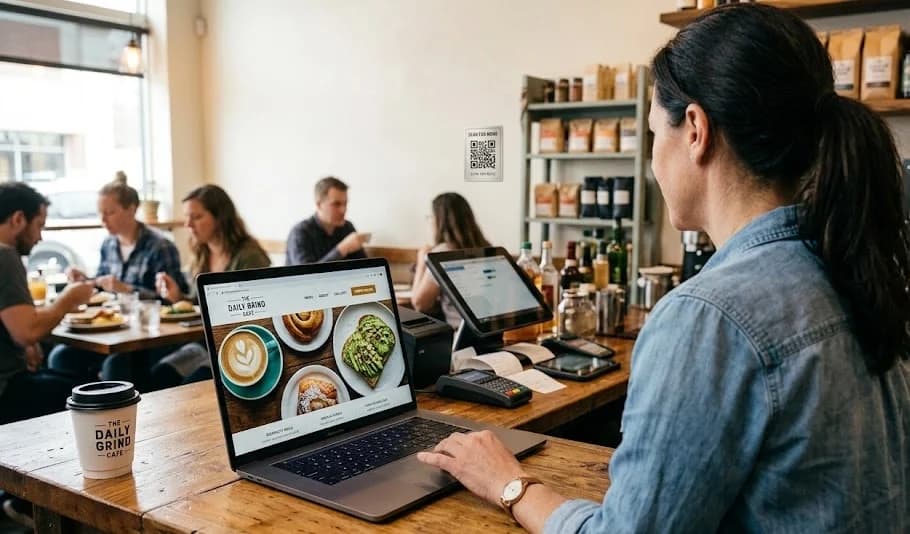
How to Create a Restaurant Website Without Hiring a Developer
If you own a restaurant, café, food truck, or small food business, you probably know that having an online presence matters.
But there's a problem.
The moment someone says "you need a website," it can sound like you're about to enter the world of developers, hosting, domains, coding, maintenance, plugins, technical errors, and expensive monthly bills.
For a small restaurant owner, that's enough to make the whole idea feel unnecessary.
You might already have Instagram. Maybe you have a Facebook page, a Google Business Profile, and your customers can find you on a food delivery platform.
So why bother creating a website?
And more importantly, do you really need to hire a developer to build one?
The good news is that you don't.
A modern restaurant website doesn't need to be complicated. For most small restaurants, what matters is having a professional place where customers can quickly see your menu, understand who you are, find your location, and know how to contact you.
Here's how to create one without hiring a developer.
First, Understand What Your Restaurant Website Actually Needs
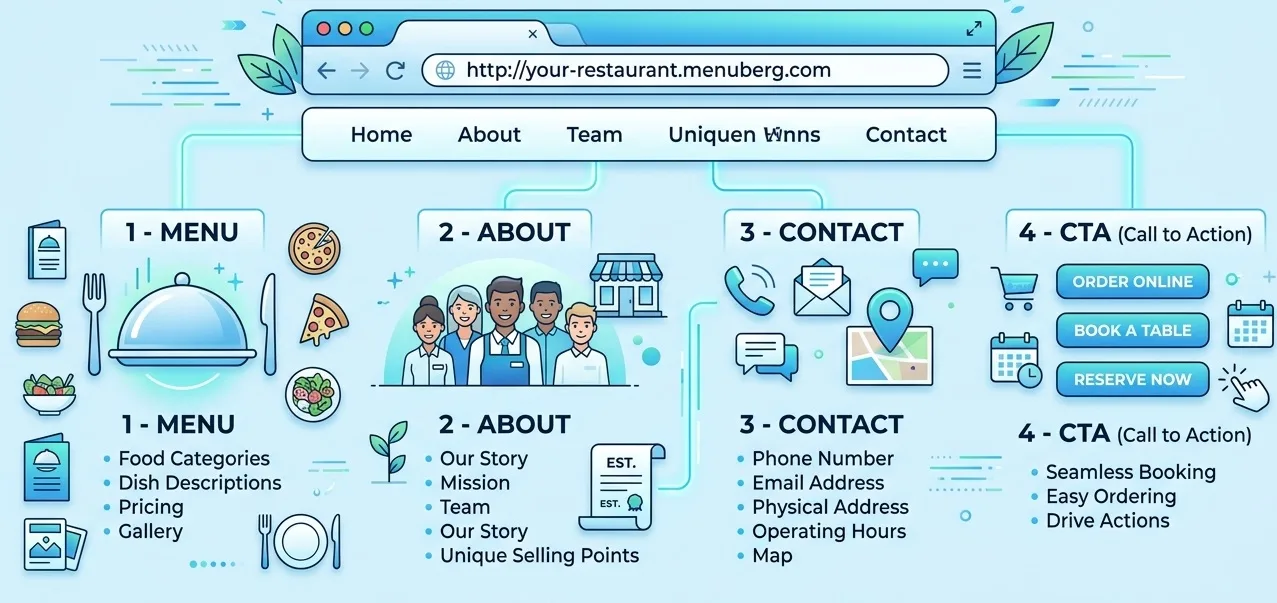
One of the biggest mistakes restaurant owners make is assuming that a website needs dozens of pages and complicated features.
It usually doesn't.
A small restaurant can have an effective website with just a few essential sections:
- A menu
- An About section
- Contact information
- Location and opening hours
- Clear calls to action
- Mobile-friendly design
- High-quality food and restaurant images
That's enough to give customers a central online destination.
Your website doesn't need to become an enormous corporate website.
In fact, making it complicated can sometimes make it worse.
A customer searching for your restaurant usually wants a few simple answers:
What do you serve?
How much does it cost?
Where are you located?
When are you open?
How can I contact you?
The faster your website answers those questions, the better the experience.
Step 1: Decide What You Want Your Website to Do
Before choosing a platform, decide what job your website is supposed to perform.
This sounds obvious, but it's an important step.
Your restaurant website isn't just an online business card.
It can become the place where customers go after discovering you through Google, Instagram, Facebook, a QR code, a recommendation, or a search.
For a small restaurant, the primary goal might be:
Turn online attention into real-world customers.
That doesn't necessarily mean online ordering.
Your website can guide visitors toward actions such as:
- Viewing your menu
- Calling your restaurant
- Visiting your location
- Sending a message
- Finding your opening hours
- Sharing your restaurant with someone else
Think of your website as your restaurant's digital storefront.
Your social media accounts can help people discover you, but your website gives them a controlled place to learn about your business.
Step 2: Choose a Domain Name
Your domain is the web address customers type into their browser.
Ideally, it should be simple and closely connected to your restaurant's name.
For example:
yourrestaurant.com
If the exact .com isn't available, you can consider other suitable domain extensions.
Try to avoid:
- Extremely long domains
- Difficult spellings
- Random numbers
- Excessive hyphens
- Names that don't resemble your restaurant
Your domain is something customers may see on menus, receipts, social media profiles, Google, QR codes, and printed material.
Simple is usually better.
Step 3: Choose How You Will Build the Website
This is where many restaurant owners assume they need a developer.
You have several options.
Hire a developer
A developer can build a completely customized website for you.
This can make sense for restaurants with unusual technical requirements or a large budget.
But for a small restaurant that simply needs a professional online presence, custom development may be unnecessary.
You could end up paying for features you don't need while becoming dependent on someone else for small changes.
Use a general website builder
Platforms such as general-purpose website builders allow you to create websites without coding.
They can be useful, but they are designed for many types of businesses.
That means you may have to configure things yourself that are particularly important for restaurants.
Use a restaurant-focused website builder
A restaurant-focused platform is designed around the needs of restaurants from the beginning.
This can remove much of the technical work.
For example, Menuberg is built specifically to help small restaurants create a professional website without requiring a technical team.
The idea is simple: restaurant owners should be able to focus on their food and customers rather than learning how websites work.
Step 4: Build the Essential Pages
You don't need 20 pages.
For many small restaurants, three core pages can provide an excellent foundation.
Menu
This is arguably the most important page.
Customers often visit a restaurant website specifically because they want to see what is available before deciding whether to visit.
Your menu should be:
- Easy to read
- Mobile-friendly
- Clearly categorized
- Up to date
- Easy to navigate
- Clear about prices
Avoid uploading a tiny image of your entire printed menu and calling it a digital menu.
Customers shouldn't have to pinch and zoom repeatedly just to find the price of a burger.
A proper web menu should behave like a website, not like a photograph of a piece of paper.
About
Your About page gives customers a reason to connect with the restaurant beyond the food.
Tell them who you are.
You could explain:
- How the restaurant started
- What type of food you specialize in
- What makes your restaurant different
- Your philosophy
- Your story
- What you want customers to experience
You don't need to write an autobiography.
A few genuine paragraphs can be more effective than generic marketing language.
Contact
Make it extremely easy for customers to contact or visit you.
Include:
- Phone number
- Address
- Opening hours
- Relevant social profiles
- Other useful contact methods
- Location information
Don't make customers hunt through your website to find your phone number.
Step 5: Make Your Menu Easy to Update
This is one of the most overlooked parts of restaurant websites.
Restaurants change their menus.
Prices change.
A dish sells out.
A seasonal item becomes available.
An ingredient becomes unavailable.
A restaurant may temporarily stop serving a particular item.
If changing your menu requires contacting a developer every time, eventually you'll stop updating it.
That's a problem.
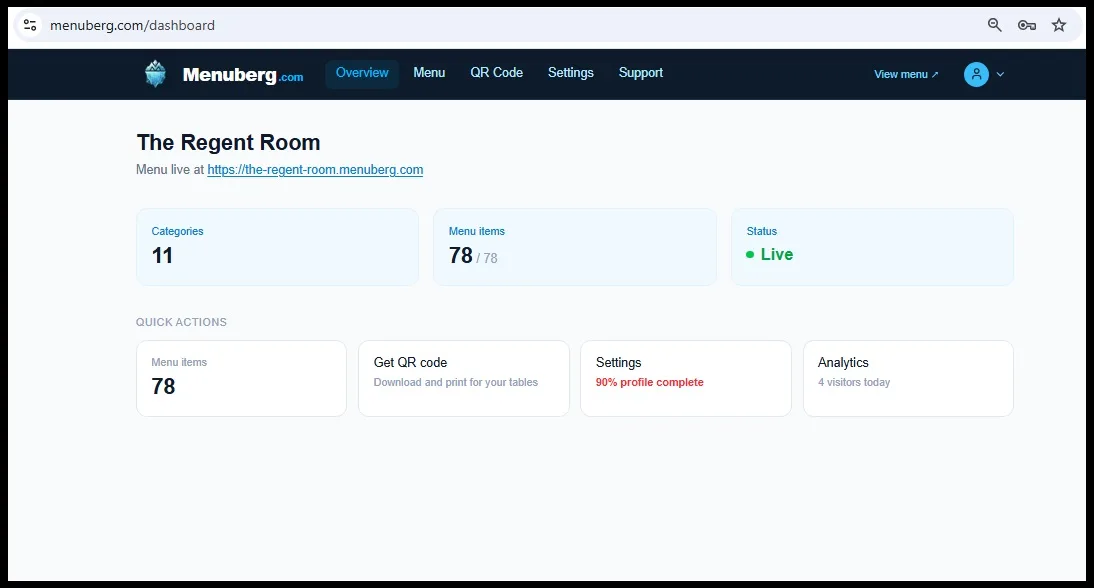
Your website should allow you to manage your menu yourself.
For example, Menuberg allows restaurant owners to manage menu items from an administration dashboard and enable or disable individual items with a single click.
That means if today's special sells out, you shouldn't need to call a developer.
You simply update it yourself.
This is one of those small features that can save a restaurant owner a surprising amount of time.
Step 6: Make the Website Mobile-Friendly
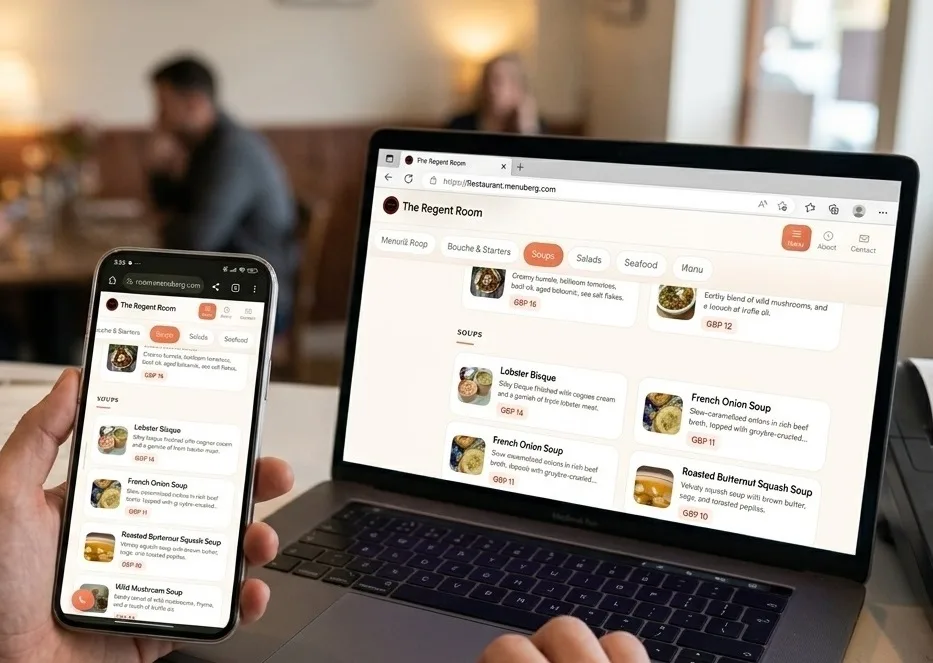
This isn't optional.
A large percentage of restaurant website visits happen when people are using their phones.
Someone might be standing outside your restaurant.
They might be sitting in their car deciding where to eat.
They might see your Instagram post while using their phone.
They might scan a QR code from a table.
In all of these situations, your website needs to work properly on a small screen.
Check:
- Is the text readable?
- Can people scroll easily?
- Is the menu easy to navigate?
- Can they tap your phone number?
- Are buttons large enough?
- Do images load properly?
- Is important information visible without excessive scrolling?
A beautiful desktop website that is frustrating on mobile isn't a successful restaurant website.
Google also emphasizes overall page experience alongside helpful content, so usability should not be treated as an afterthought.
Step 7: Use Strong Food Photography
People eat with their eyes before they eat with their mouths.
Your website doesn't need hundreds of photographs.
It needs the right photographs.
Use clear, appetizing images of your best dishes.
Avoid blurry photographs, excessive filters, poor lighting, and unrelated stock images.
You can also show your restaurant's atmosphere, dining area, staff, or signature dishes.
The goal isn't to make the website look like a photography portfolio.
The goal is to help a potential customer imagine the experience.
Step 8: Add Clear Calls to Action
Don't make visitors figure out what to do next.
A restaurant website should guide them.
Depending on your business, your calls to action could include:
- View Menu
- Call Now
- Get Directions
- Contact Us
- Visit Us
- Message Us
Your most important action should be easy to find.
A floating call-to-action button can also be useful on mobile because the visitor doesn't have to scroll back to the top of the page to take action.
The principle is simple:
Don't just give customers information. Give them an obvious next step.
Step 9: Make Your Restaurant Easy to Find on Google
Creating a website is only half the job.
People need to be able to discover your restaurant.
Start with the basics:
- Keep your restaurant name consistent
- Clearly display your location
- Include your opening hours
- Explain what type of food you serve
- Use descriptive page titles
- Write useful page content
- Make the site mobile-friendly
- Link to your important pages
- Connect your website with your Google Business Profile
Google recommends using the words people actually search for in prominent places such as page titles, headings, link text, and other descriptive areas.
But don't turn your website into a pile of keywords.
Instead of writing:
Best Italian restaurant Italian food restaurant best Italian restaurant near me Italian restaurant menu...
Write naturally:
We serve traditional Italian dishes including fresh pasta, wood-fired pizza, and seasonal desserts in downtown Toronto.
The second version is useful to humans and gives search engines meaningful context.
Step 10: Add Analytics
You should know what visitors do after arriving at your website.
For example:
- How many people visit?
- Which pages do they view?
- Which devices do they use?
- Where are visitors coming from?
- Which pages receive the most attention?
Analytics can turn your website from something you simply own into something you can improve.
If almost everyone visits your menu page, that's useful information.
If visitors leave immediately from a particular page, that's useful information too.
You don't have to become a data scientist.
You simply need enough information to make better decisions.
Step 11: Add a QR Code
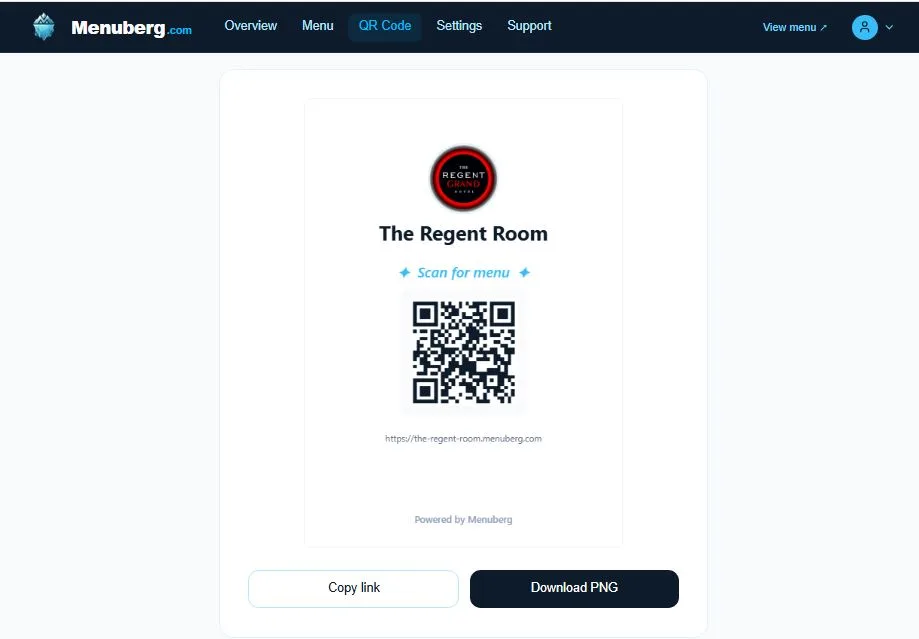
A restaurant website can also work offline.
You can place a QR code on:
- Tables
- Printed menus
- Business cards
- Receipts
- Packaging
- Flyers
- Posters
- Counter displays
Instead of sending customers to an old PDF that you can't easily update, the QR code can take them directly to your current online menu.
The advantage is that the destination can remain the same even when your menu changes.
That means you don't necessarily have to print a new QR code every time you change a dish or price.
Do You Need to Know How to Code?
No.
That's the whole point of modern website builders.
You shouldn't need to understand HTML, CSS, JavaScript, databases, DNS records, server configuration, or deployment just to put your restaurant online.
If your only goal is to create a professional restaurant website, learning all of those technologies would be like learning how to manufacture a refrigerator because you want to keep your food cold.
Useful knowledge? Absolutely.
Necessary? No.
Your time is probably better spent running your restaurant.
What About Menuberg?
If you're a small restaurant owner who wants a website without dealing with technical development, Menuberg is designed around exactly this problem.
You can create a complete restaurant website with essential pages such as your Menu, About, and Contact sections.
You can manage your menu from an administration dashboard, add unlimited menu items, enable or disable items when needed, choose from multiple themes and menu layouts, generate a QR menu, and view visitor information.
The objective isn't to give every restaurant a complicated enterprise website.
It's to give small food businesses the important pieces they actually need—without requiring a technical team.
And because your restaurant's website is something you should be able to manage yourself, routine changes shouldn't require a developer.
How Much Should a Restaurant Website Cost?
There isn't one correct price.
A completely custom website can cost considerably more because you're paying for design, development, customization, maintenance, and sometimes ongoing technical support.
A Menuberg Website Costs Less Than a Burger a Month.
But not every restaurant needs that level of complexity.
If your requirements are straightforward—a professional design, menu, restaurant information, contact details, mobile compatibility, menu management, analytics, and QR functionality—you may not need to spend thousands on custom development.
The better question isn't:
"How cheap can I make my website?"
It's:
"What does my restaurant actually need, and am I paying for things I will never use?"
That's the difference between cutting costs and spending intelligently.
Common Mistakes to Avoid
Before launching your restaurant website, check for these common problems.
Making customers download your menu
A downloadable PDF can be useful as an additional option, but it shouldn't be the only way customers see your menu.
Using outdated prices
An incorrect price can damage trust faster than having no price at all.
Hiding your contact information
Your phone number, location, and opening hours should be easy to find.
Ignoring mobile users
Always test the website on an actual phone.
Using too many animations
Your website is not a movie trailer.
Animations should support the experience, not slow customers down.
Making the website all about the restaurant
The website should answer the customer's questions, not just tell them how amazing the restaurant is.
Forgetting to update the menu
A beautiful website with an outdated menu is still a bad customer experience.
The Simplest Way to Think About Your Restaurant Website
You don't need to build the next Amazon.
You don't need 50 pages.
You don't need a development team.
You need a website that answers the questions customers already have.
What do you serve?
How much does it cost?
Where are you?
When are you open?
How do I contact you?
Why should I choose you?
If your website answers those questions quickly, looks professional, works beautifully on mobile, and is easy for you to keep updated, you've already solved the biggest problem.
The technology should stay in the background.
Your restaurant should be the star.
And that's ultimately what a restaurant website should do: make it easier for customers to choose you.
Final Checklist
Before publishing your restaurant website, make sure you have:
- A simple domain name
- A professional mobile-friendly design
- An easy-to-use online menu
- Current menu prices
- Your restaurant's story or About section
- Phone number and contact information
- Location and opening hours
- Clear calls to action
- Good food photography
- Google Business Profile connected
- Analytics installed
- A QR code linking to your website/menu
- A simple way to update your menu
You don't need a developer for every one of these tasks.
You need the right tools, a clear plan, and a website designed around the way a restaurant actually operates.
Ready to build your restaurant's online presence?
Menuberg helps restaurants launch a professional website and QR digital menu in minutes — no coding required.
Create Your Restaurant WebsiteRelated Articles

Restaurant Marketing Checklist: What to Do Every Week and Every Month
A realistic, no-burnout routine for restaurant marketing — what's worth checking weekly, reviewing monthly, and revisiting every few months, without turning it into a second job.
11 Sept 2026 · 13 min read
How to Handle Negative Restaurant Reviews: A Practical Dos and Don'ts Guide
A bad review doesn't have to hurt your restaurant's reputation — how you respond to it does more work than the review itself. Here's a clear, practical dos-and-don'ts approach.
6 Sept 2026 · 14 min read
New Restaurant Checklist: Getting Your Online Presence Right From Day One
A practical, ordered checklist for getting your restaurant's website, Google profile, menu, and social presence right before, during, and after opening week — not scrambled together at the last minute.
3 Sept 2026 · 12 min read
About Menuberg
Menuberg helps restaurants create professional websites and digital storefronts without complicated setup. Learn more.